Run your enterprise application programme from one place.
Hold the programme to one plan, one set of registers and one weekly rhythm.
14-day free trialNo credit card required



Built for programmes on
- SAP S/4HANA
- Oracle Fusion
- Workday
- Salesforce
- Microsoft Dynamics
One programme record, whatever the platform.
Built for the people who run the programme.
The record is the same for everyone. What changes is the question each person brings to it.

PMO director
Runs the programme office and answers for status across every workstream.
In CommandCC they
- See every programme's status on one page
- Run quality gates with signed criteria
- Build steering packs from live records

SI delivery lead
Delivers the programme for the client as the system integrator.
In CommandCC they
- Send client-ready status reports
- Keep one RAID log, linked to the plan
- Report the same way on every programme

CIO
Answers to the board for the programme and its budget.
In CommandCC they
- Read health, risk and spend in one view
- See which gates are blocked, and why
- Get a second reading of programme health

Independent PM
Runs a programme for a client, often from day one and often alone.
In CommandCC they
- Import the client's plan from MS Project, Excel or CSV
- Open a full RAID log before the first steering committee

SAP functional lead
Owns the design and build of a workstream, object by object.
In CommandCC they
- Move every build object through its stages
- Raise change requests with a written impact
- Follow test cycles and defects for the workstream

Test and cutover manager
Takes the programme from the first test cycle to go-live.
In CommandCC they
- Run test cycles from unit test to dry run
- Work the cutover from a timed runbook
- Record the go or no-go with sign-off
From the first plan to go-live.
Each module keeps its own register, and every register feeds the same programme record.
Programme planning
A plan the whole programme works from.
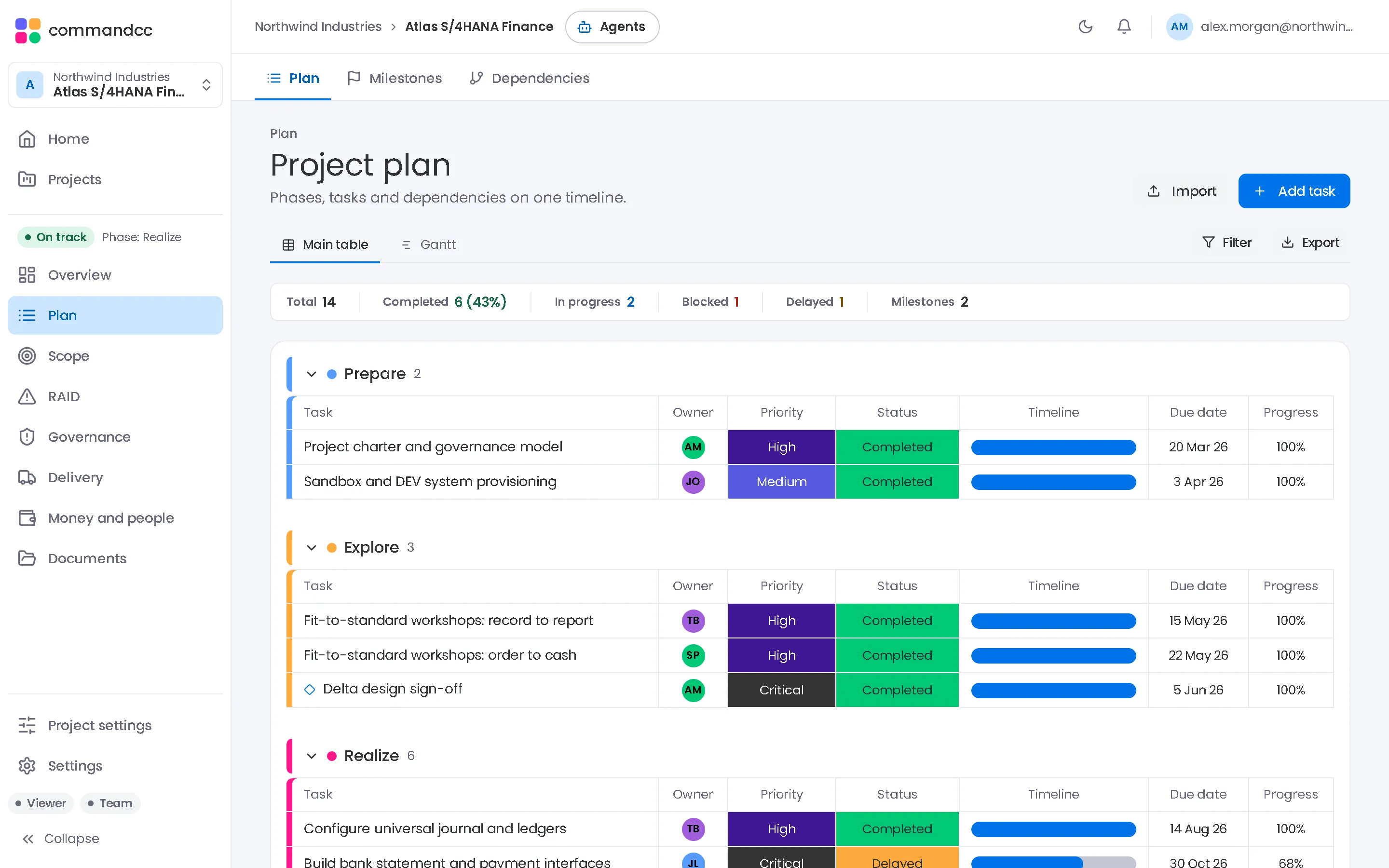
Build phases, tasks and milestones with owners, dates and workstreams, or import the plan you already have. Switch between the main table and a Gantt view, and record the dependencies that cross from one workstream to another.
- Import MS Project XML, Excel or CSV
- Main table and Gantt view by week, month or quarter
- The next three milestones, with the days left
- Dependency types and lag, with cross-workstream links flagged
RAID management
Risks, issues, actions and decisions in one log.
Risks are scored by probability and impact and shown on a heatmap. Issues show what is blocked, actions carry an owner and a due date, and decisions keep the reasoning behind them.
- Probability times impact scoring on a 4 by 4 heatmap
- Turn a risk that happens into an issue
- Overdue actions flagged and closed in bulk
- Decisions with rationale, alternatives and who decided
Quality and governance
Gates that pass on signed criteria.
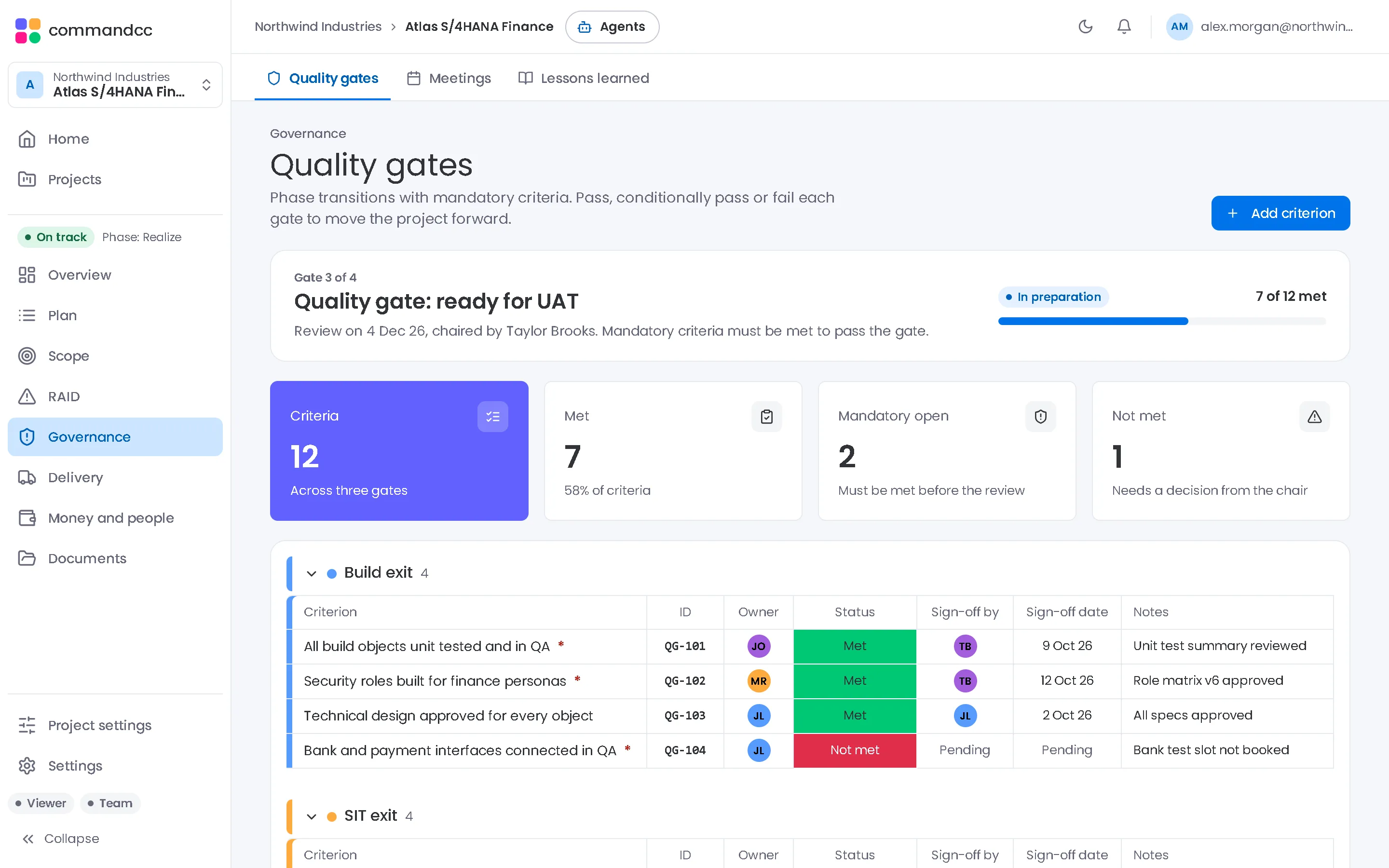
Each quality gate lists its criteria with an owner and a sign-off. Mandatory criteria must be met before a full pass, and the outcome is recorded as it happened. Meetings keep their minutes and lessons learned stay on file.
- Criteria with an owner, a sign-off and a date
- Mandatory criteria block a full pass
- Pass, pass with conditions or fail
- Meetings with agenda, attendees and minutes
Cutover management
A runbook that shows whether go-live is on time.
Every step has a planned window, an owner, a backup and a predecessor. Record actual times as the weekend runs and see the variance, the delays downstream and the next go or no-go point.
- Import the runbook from Excel, or generate a starting plan
- Planned against actual, step by step
- A delayed step flags the activities after it
- Go or no-go points need a named sign-off
Budget and resources
Spend against plan, and the people behind it.
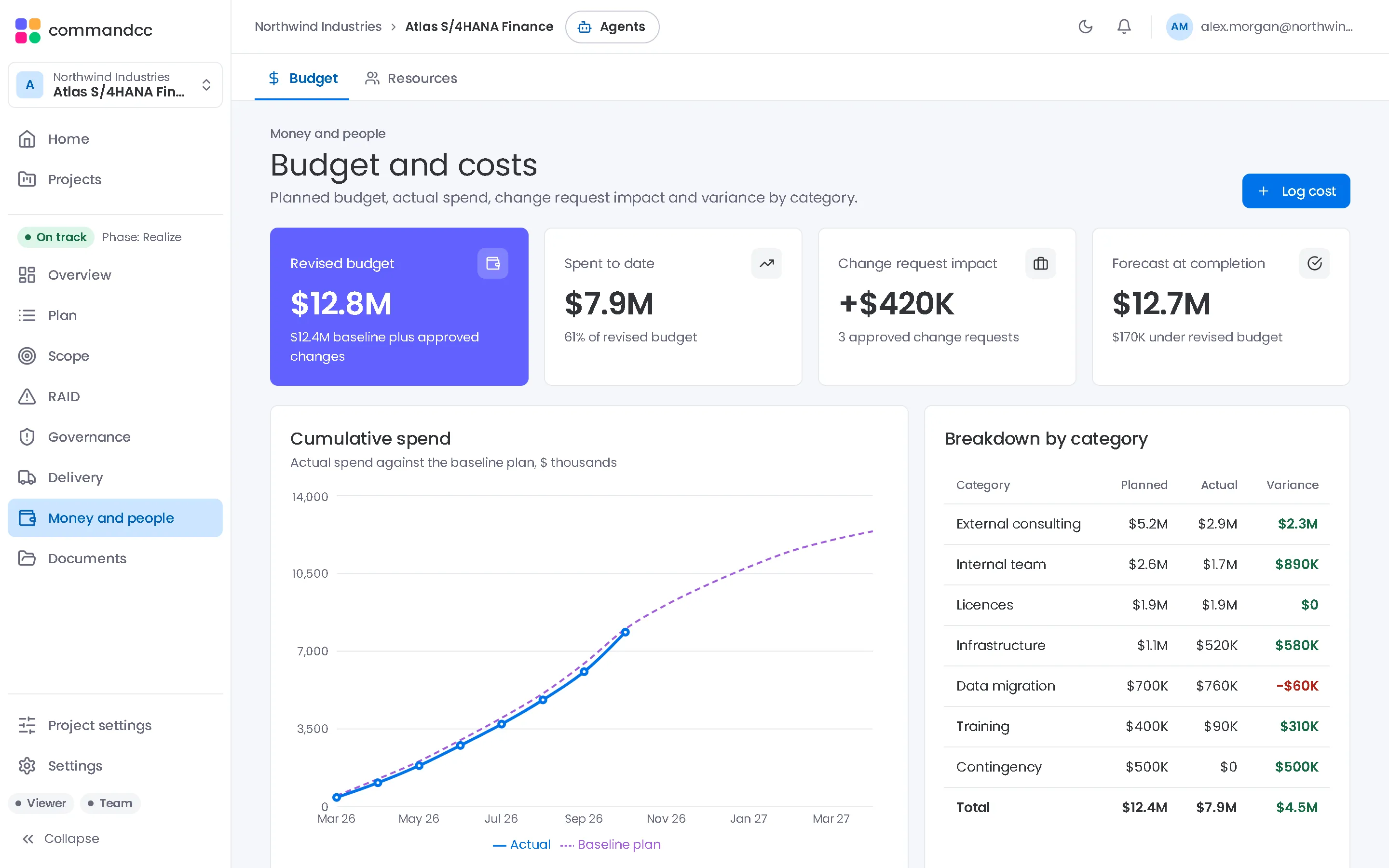
Set the budget by category, log each cost with its vendor and approver, and see the revised budget once approved change requests are added. The resource plan shows who is allocated where and what the team will cost.
- Planned, spent, remaining and variance by category
- Approved change requests feed the revised budget
- Allocation, roll-off dates and daily rate per person
- Projected team cost from allocation and rate
Portfolio reporting
Status reports from the record, not a slide deck.
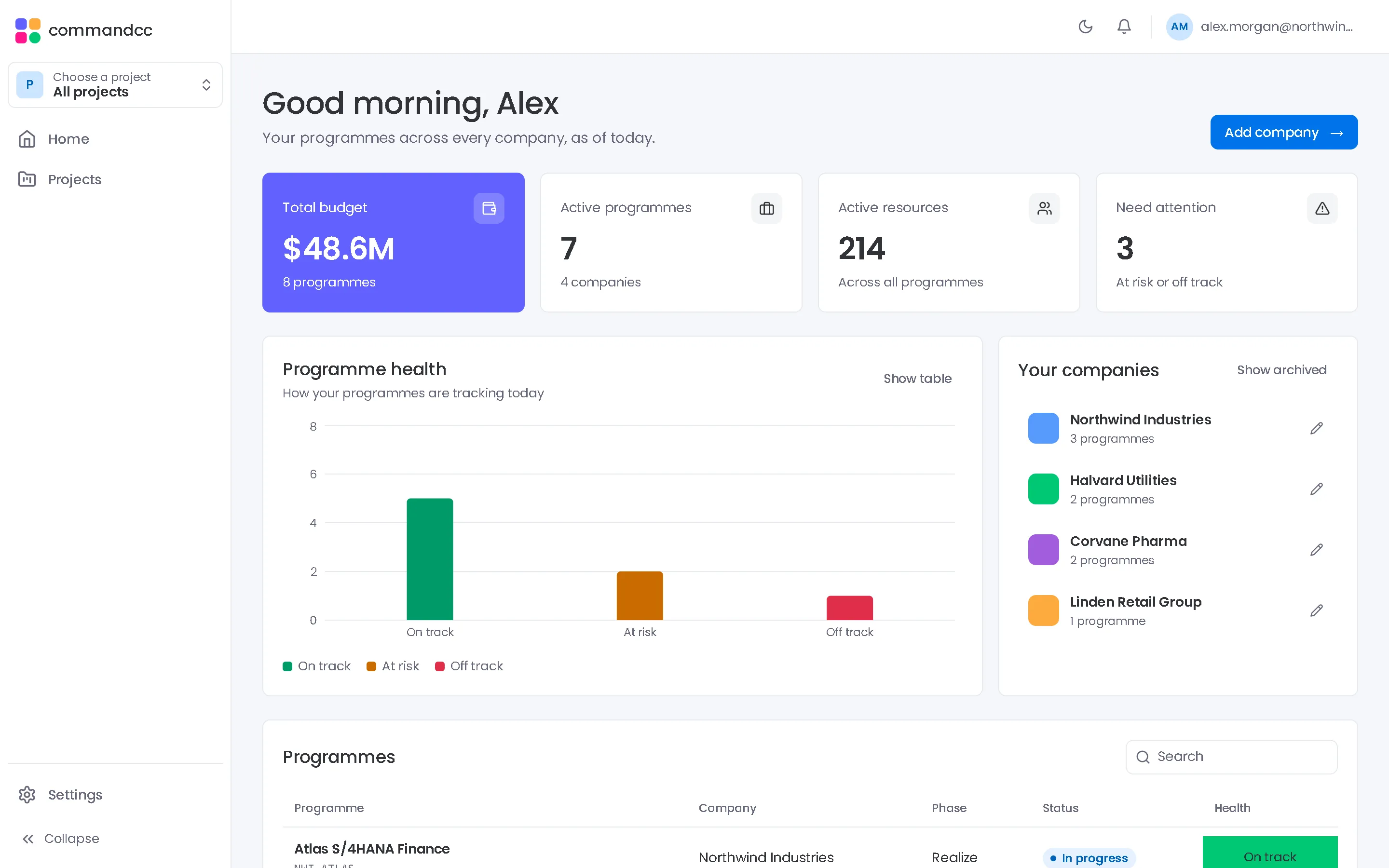
The executive summary reads schedule, budget and quality health from the records the team already keeps. A status report takes a snapshot, adds the programme manager's commentary and is marked final.
- Executive summary with the days to go-live
- Dashboards built from widgets, with quick filters and PDF export
- Weekly, monthly and ad hoc status reports
- Every company and programme on one home view
Agents that do the programme admin.
Six agents read the live programme record and draft the work a PMO does by hand every week. Four use AI; Cutover and Gate Readiness are rule-based checks.
- Available
Health Assessment Agent
Reviews the plan, RAID log, budget and gates, and returns a health rating with the reasons behind it.
Amber at 68% confidence, with the concerns that drive it.
Example output Programme healthConfidence 68%, from the plan, RAID log, budget and gates
- ConcernSIT pass rate is 87% against a 95% target
- Early warningThree high risks have no mitigation date
- ConcernUAT testers are not yet confirmed by the business
- Available
Status Report Agent
Drafts a status report for the period: overall RAG, RAG per area, achievements, next steps, escalations and decisions needed. It saves as a draft the programme manager edits.
Overall Amber, Testing Red, 2 decisions needed.
- Available
RAID Agent
Reads a meeting's minutes or pasted notes and proposes risks, issues, actions and decisions with owners and due dates. Duplicates of existing items are skipped.
From the steering notes: 2 risks, 1 issue and 3 actions proposed.
- Available
Cutover Agent
A rule-based check of the runbook for slippage, projected finish and go or no-go risk.
Go or no-go risk is high: the decision point is projected 2 hours late.
- Available
Gate Readiness Agent
A rule-based verdict of ready, conditional or not ready, listing the mandatory criteria still open.
Not ready: 2 mandatory criteria still open.
- Available
Test Triage Agent
Groups failed or blocked tests and open defects into clusters, each with a likely cause, a suggested owner and a priority. An action is created for each cluster you accept.
14 failures in 3 clusters, led by interface mapping.
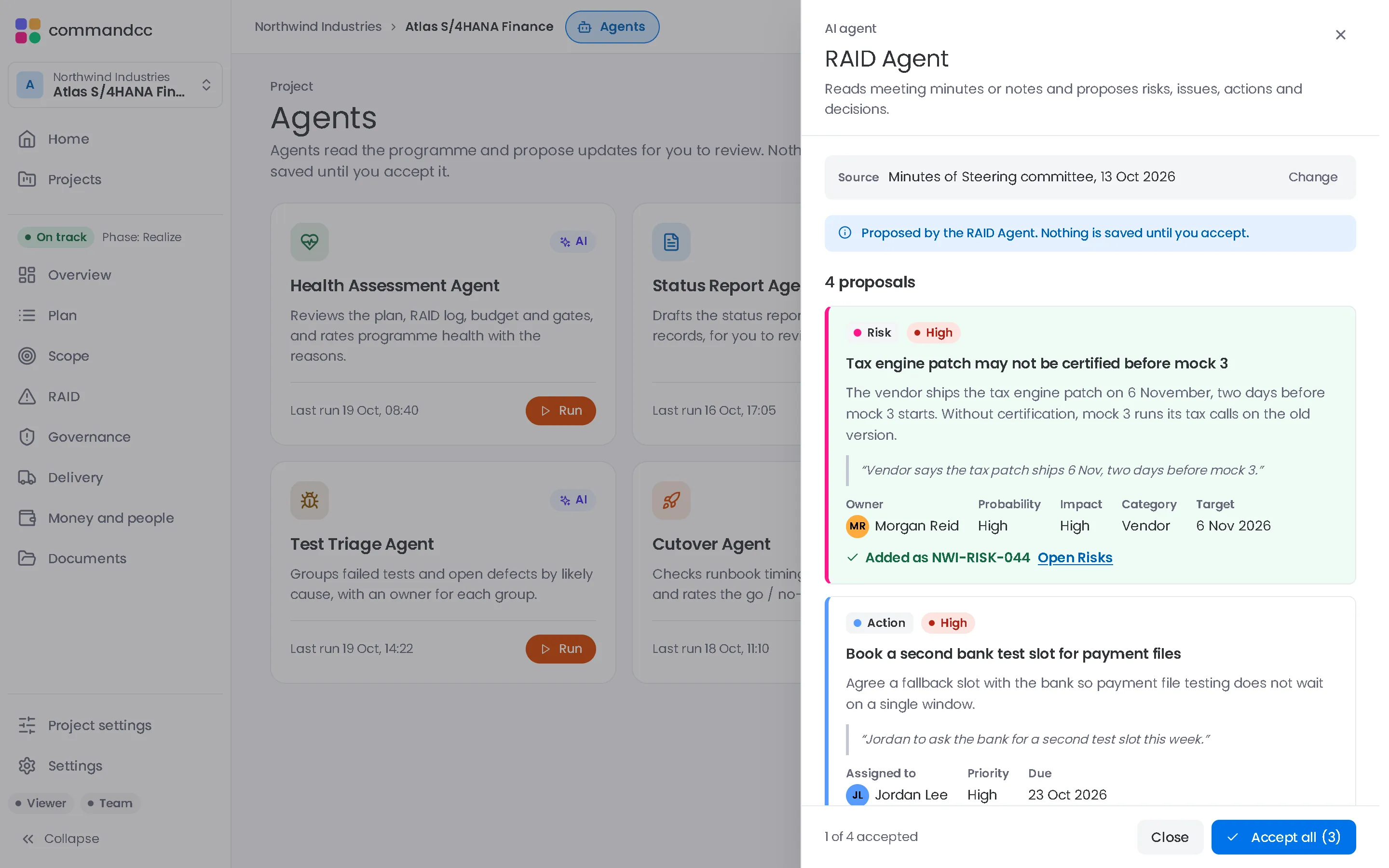
Agents propose. Nothing is saved until someone on the team accepts.
The AI agents (Health, Status Report, RAID and Test Triage) are on Professional and Enterprise. Each person turns AI on in their own settings and chooses whether to use it for agents and project updates; a company admin can block AI for the company. Each person uses their own key.
Dashboards, sign-off and an assistant, built in.
Build the view each audience asks for, collect signatures on the records that need them, and tell CommandCC what changed instead of typing it into every register.
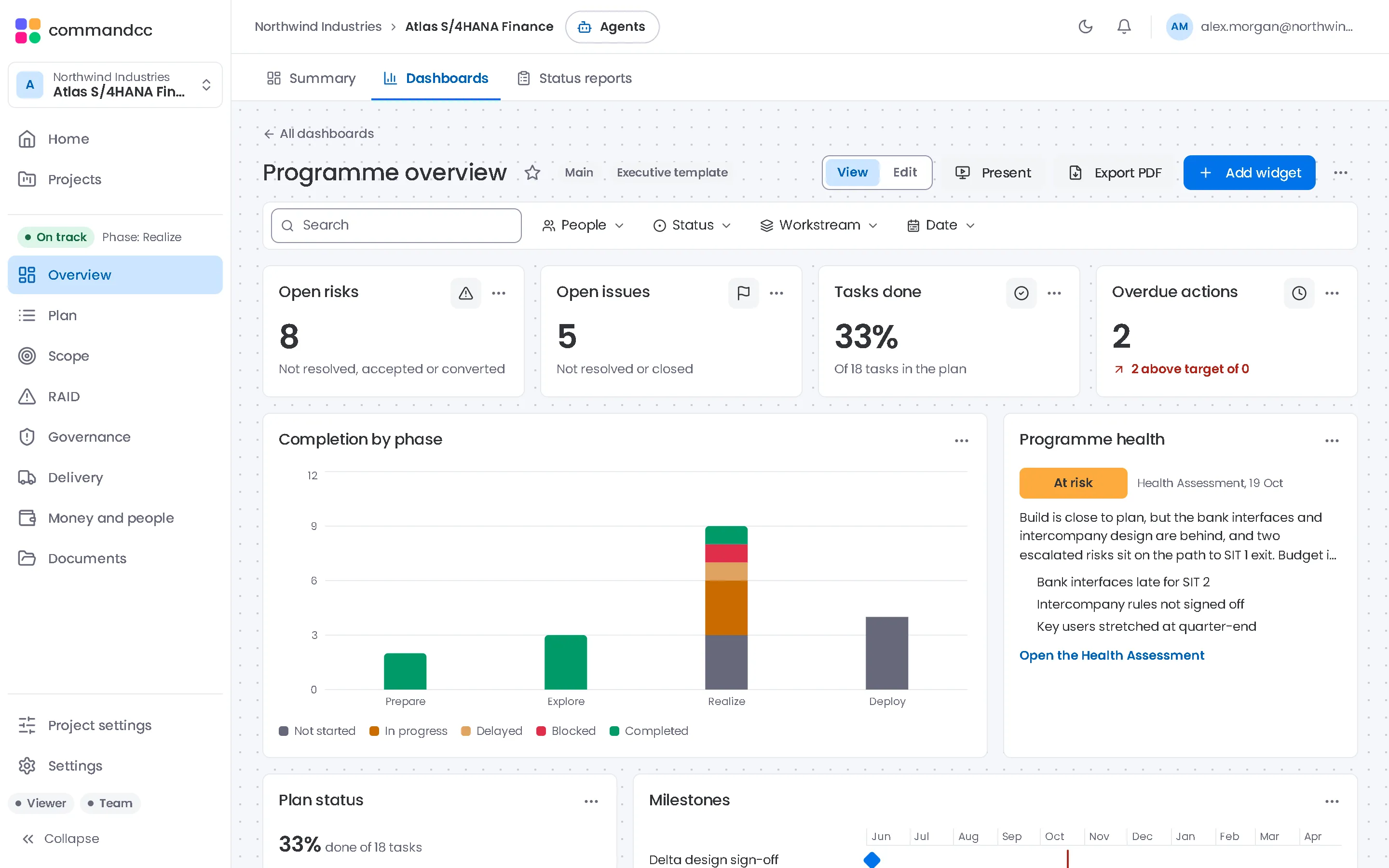
Dashboards and widgets
A dashboard for every audience, from the same record.
Start from a template or a blank page and add widgets that read the live registers. Quick filters for people, status, workstream and date apply to every widget at once, and the filtered view stays in the link you share.
- Nine widget types, from numbers, charts and battery to workload and agent findings
- Templates for an executive view, RAID, testing, cutover and budget
- Present mode cycles the widgets on a meeting-room screen
- Export to PDF for the steering pack
Built-in e-signature
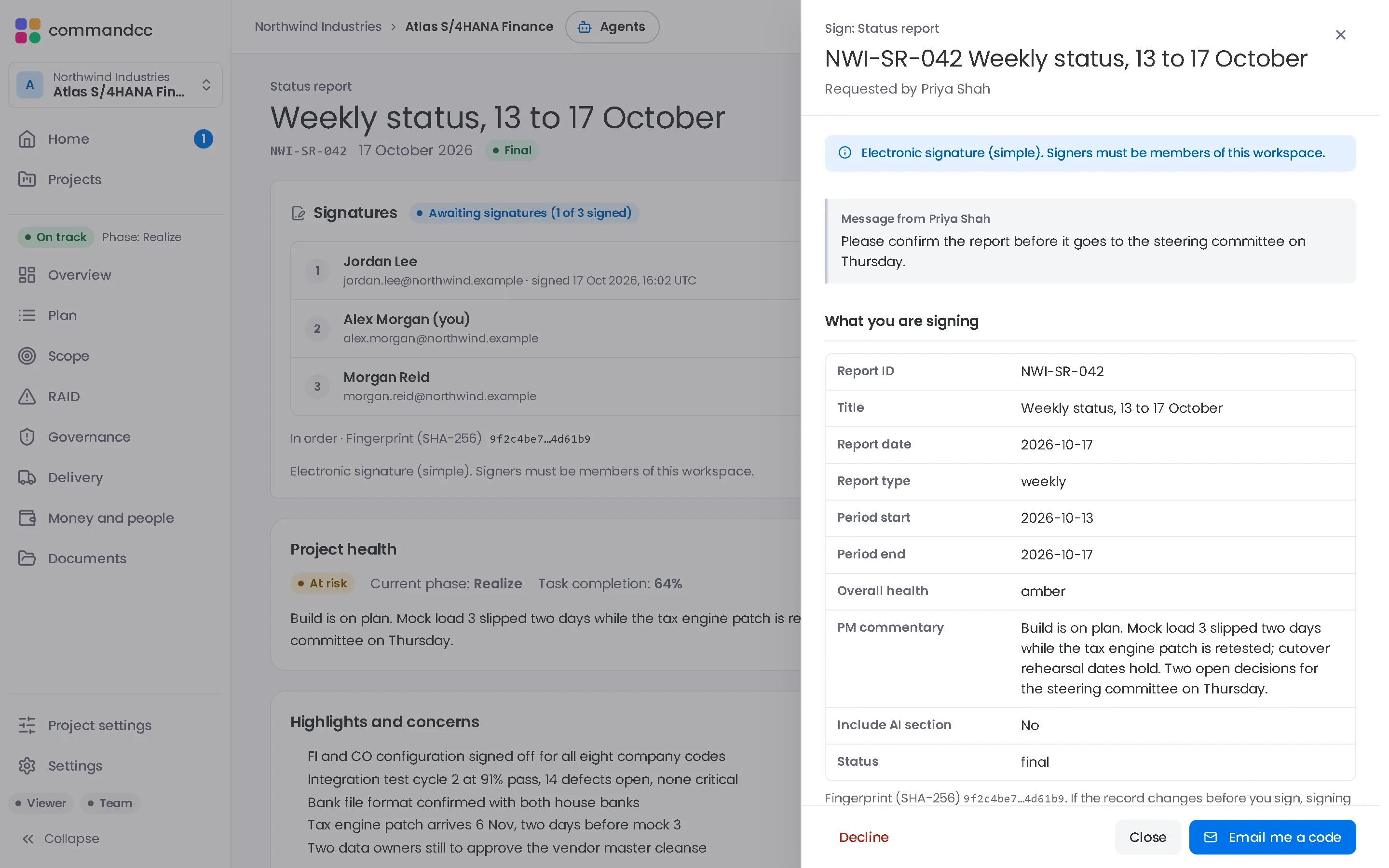
Sign-off that stays with the record.
Request signatures on a quality gate decision, a final status report, a change request, a document or the cutover go or no-go. Each signer reviews a read-only snapshot, types or draws a signature, and confirms with a one-time code sent to their account email.
- Signers in a set order or all at once
- A fingerprint flags a record that changed after signing
- A signature certificate PDF, filed in the Documents register
- My signatures on Home lists what is waiting for you
An ordinary electronic signature at the simple level, not a qualified one. Signers must be members of the workspace.
Assistant and voice
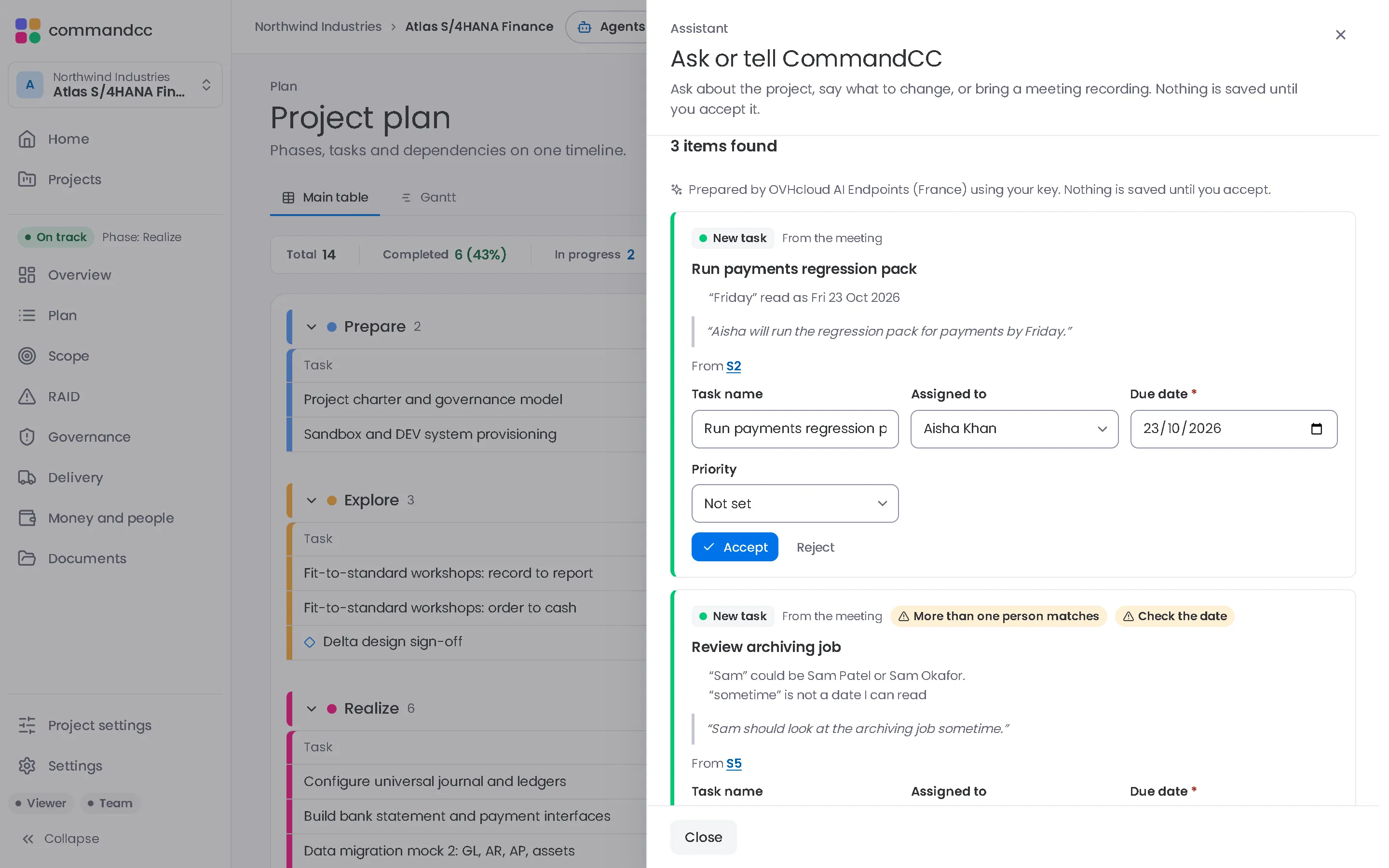
Type it, say it or bring the meeting.
Speak to CommandCC opens one place to ask a question, say what changed or import a meeting recording. The assistant proposes the changes with links back to what was said, and you accept the ones you want.
- A meeting becomes proposed tasks, risks, issues, actions and decisions, each linked to its passage in the transcript
- What is overdue, blocked or changed this week, answered from your records with links to them
- A weekly report draft that keeps the facts from the records apart from the assistant's suggestions
- Accept, edit or reject each proposal: nothing is saved until you accept
AI is optional: each person turns it on in their own settings, a company admin can block it for the company, and each person uses their own key. Questions answered straight from the records need no AI call. The mic stops at 5 minutes; an imported meeting can be up to 30 minutes and 25 MB.
Nine modules, one programme record.
A risk links to the task it threatens, a change request links to its cost, and a failed test becomes an issue.
Import the plan from MS Project XML, Excel or CSV, then track scope, change requests and every build object against it.
Risks, issues, actions and decisions link to the tasks and meetings they belong to, and the status report reads from them.
Each quality gate has signed criteria and owners, so a go or no-go decision rests on a record rather than a slide.
A timed runbook with owners, predecessors and sign-off that everyone on the cutover call reads from.
Card 1 of 9: Portfolio and reporting
Portfolio and reporting
Health, status reports and the executive summary across every programme.
Planning
Plans, milestones and dependencies with a Gantt view and MS Project import.
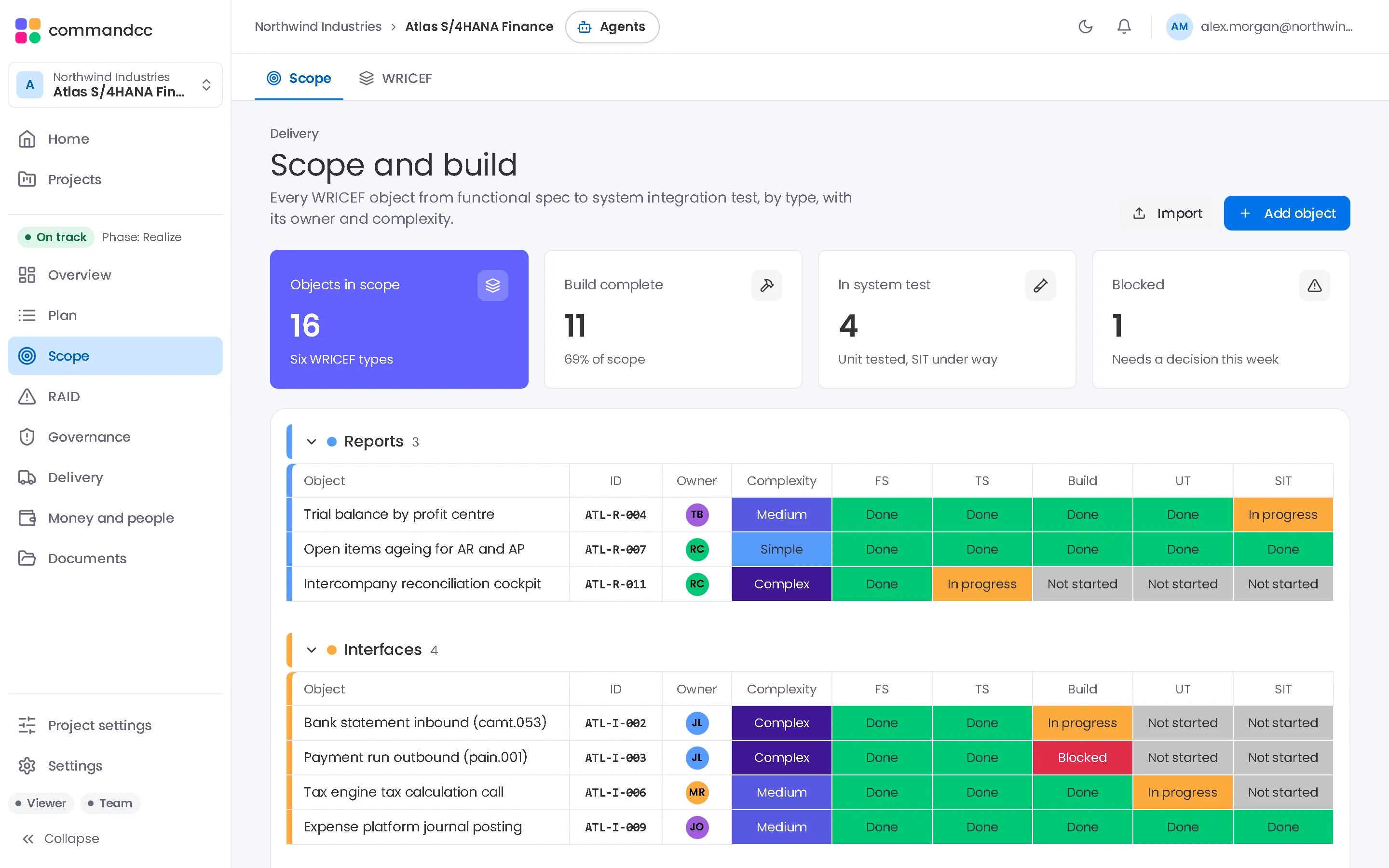
Scope and build
The scope baseline, change requests and every build object from design to UAT.
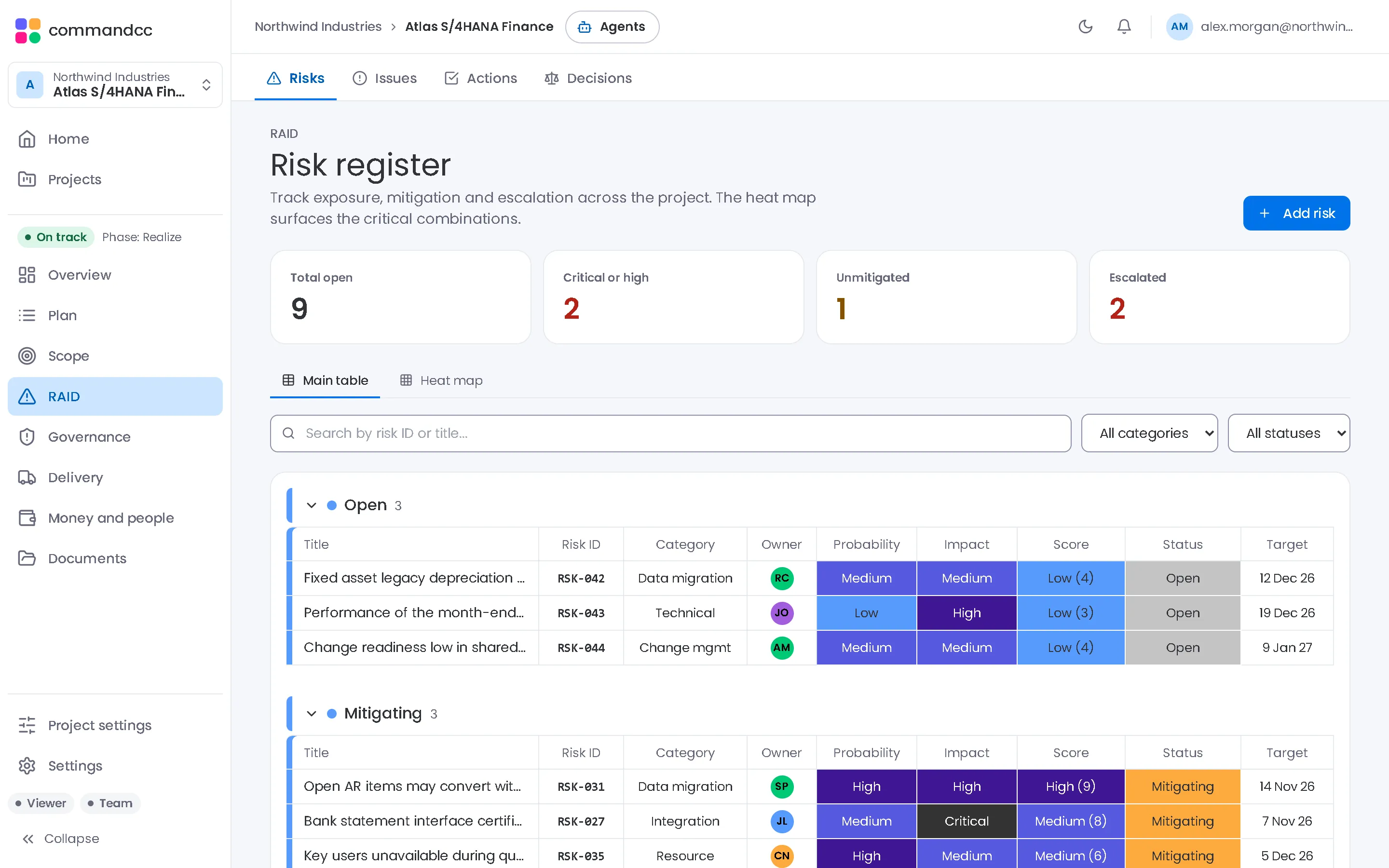
RAID
Risks, issues, actions and decisions in linked registers.
Governance
Quality gates with signed criteria, meetings with minutes, and lessons learned.
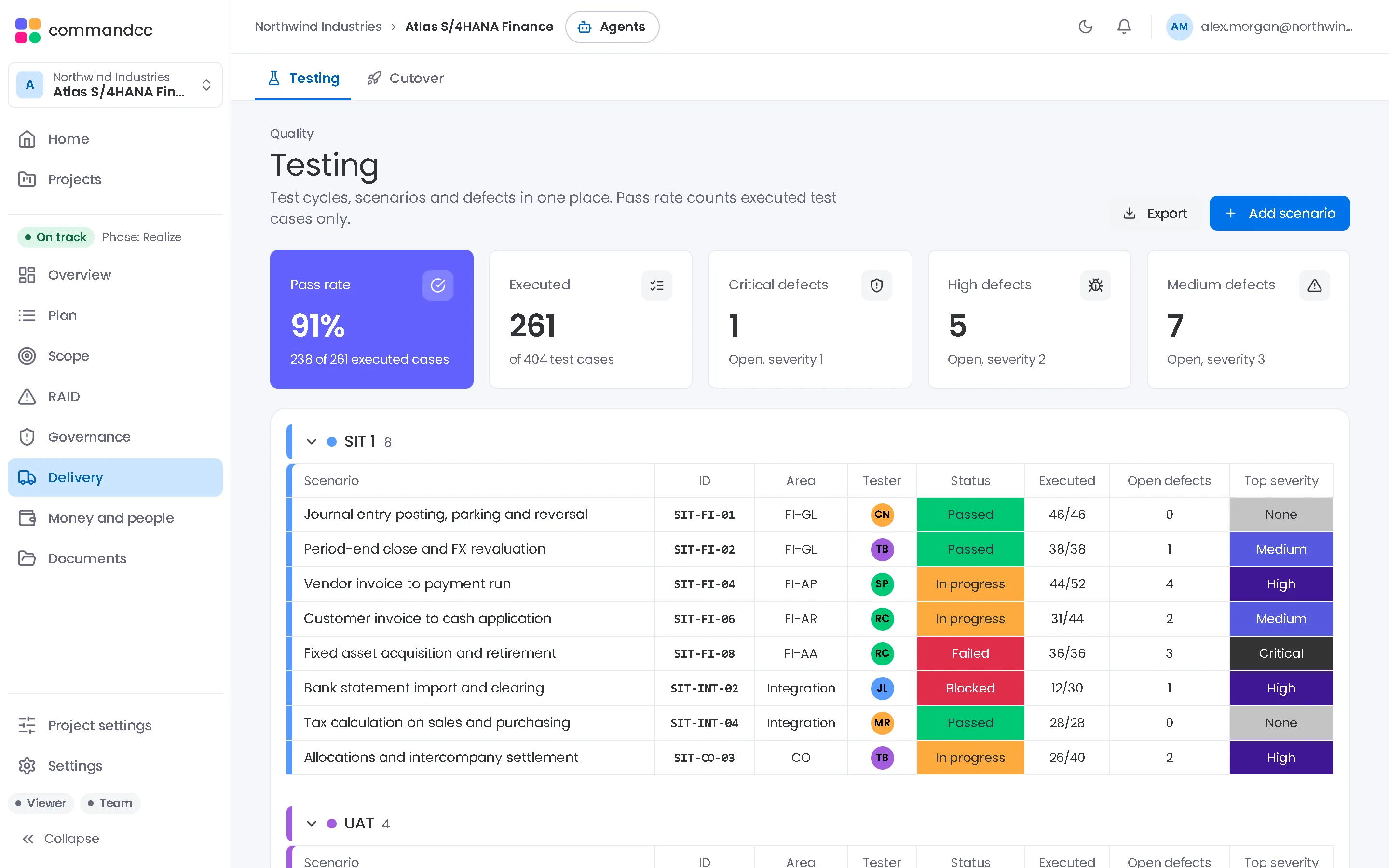
Testing
Test cycles, scenarios and cases, with defects raised as issues.
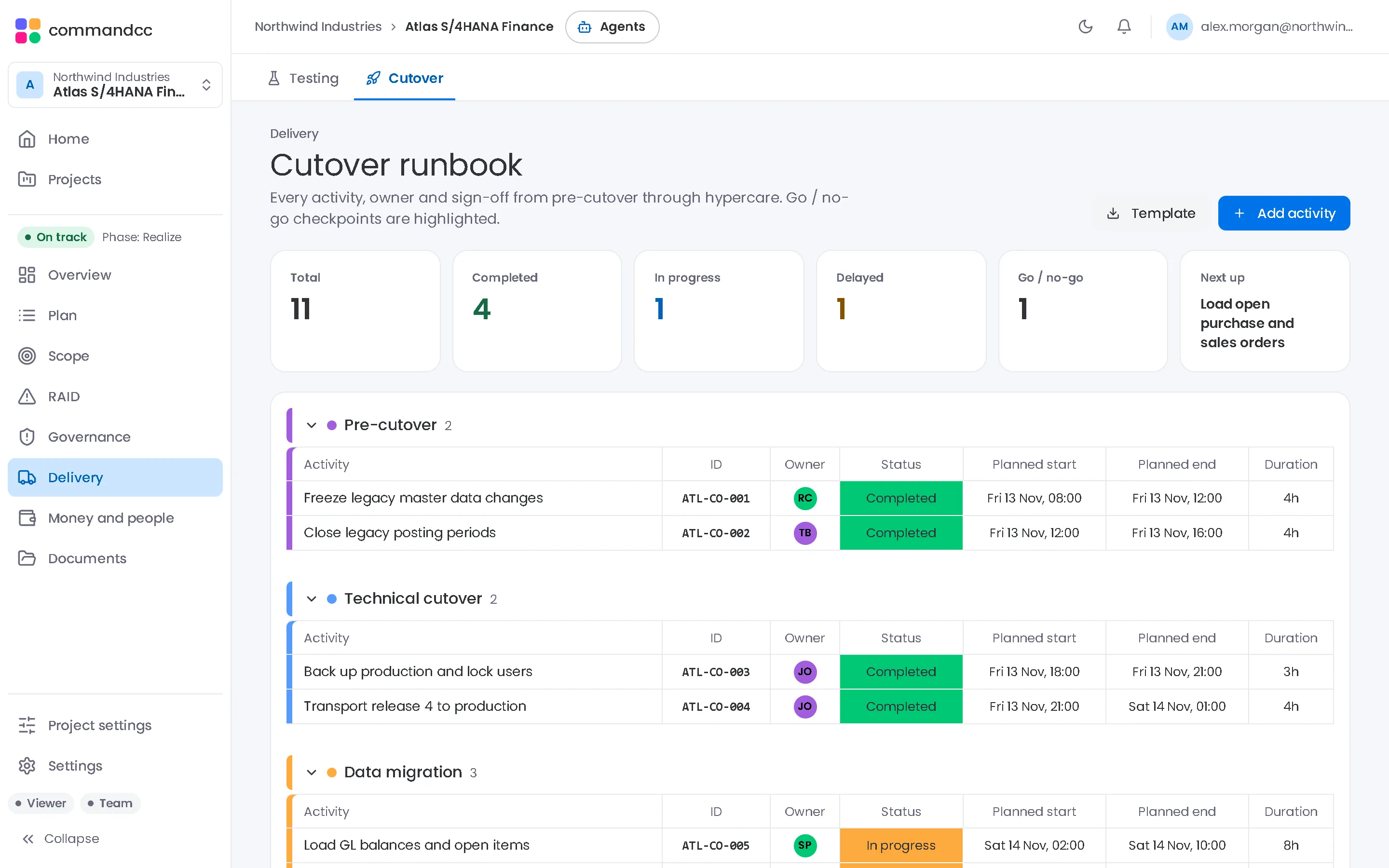
Cutover
A timed runbook with owners, predecessors and go or no-go sign-off.
Budget and resources
Plan against actual spend, and who is allocated to which workstream.
AI assistant
A health reading of the programme with concerns, warnings and next steps.
Plan it. Prove it. Go live.
Start from where your programme is today.
Bring the plan you have
Import from MS Project XML, Excel or CSV. CommandCC detects the task name, date and outline-level columns.
More about bring the plan you have
Test cases and cutover runbooks import from Excel templates.

The people doing the work and the people answerable for it read the same record.

Any enterprise application
Programmes implementing SAP S/4HANA, Oracle Fusion, Workday, Salesforce or Microsoft Dynamics use the same modules.
More about any enterprise application
CommandCC manages the programme and does not connect to the application being implemented.
Security and compliance, stated plainly.
What protects your programme data today, and which reports are committed but not yet issued.
Security posture
7 roles
Row-level security limits records to the company that owns them. Data travels over HTTPS and is encrypted at rest.
How we protect your dataCompliance status
GDPR ready
SOC 2 Type II and ISO 27001 are committed, not issued. We will share each report when it is issued.
See every statusData handling
3 sub-processors
Supabase, Vercel and Resend. AI requests go from your device to the provider you choose, with your own key. We do not sell your data or use it to train AI models.
Read the sub-processor list
Common questions
What is CommandCC?
CommandCC is programme management software for enterprise application rollouts. It keeps the plan, scope and build objects, RAID log, quality gates, testing, cutover, budget and status reporting in one connected record.
Which enterprise applications does it work with?
Any. Programmes implementing SAP S/4HANA, Oracle Fusion, Workday, Salesforce or Microsoft Dynamics use the same modules. CommandCC manages the programme and does not connect to the application being implemented.
Who uses it?
Client-side PMOs, system integrators, CIOs and programme directors, and independent programme managers and advisors. Stakeholders have a limited role on every plan. On Enterprise, each role also sets what that person can edit.
How do we bring in our existing plan?
Import it from MS Project XML, Excel or CSV. CommandCC detects the task name, date and outline-level columns. Test cases and cutover runbooks import from Excel templates.
Can people sign off in CommandCC?
Yes, on Professional and Enterprise. Request signatures on a quality gate decision, a final status report, a change request, a document or the cutover go or no-go. It is an ordinary electronic signature at the simple level, not a qualified one, and signers must be members of the workspace.
Can I talk to CommandCC instead of typing?
Yes, on Professional and Enterprise, once you turn AI on in your own settings (a company admin can block AI for the company) and add your own key. Press Speak to CommandCC in the top bar to ask a question, say what changed or import a meeting recording, and the assistant proposes the tasks, risks, issues, actions and decisions for you to accept. You can also dictate into meeting minutes and descriptions. Speech, including dictation, is turned into text by your provider's speech service or on your device, as you choose (always on your device if your provider is Anthropic), and CommandCC does not store the audio.
Is there a desktop or mobile app?
Yes, you can install CommandCC from your browser today, on Windows, Mac, iPhone, iPad and Android. It is the same app in its own window, with its own icon, signed in with the same account. There are no CommandCC apps in the App Store or Google Play, and there is no installer to download. The Install the app page has the steps for each device.
Is there a free trial?
Yes. The Team and Professional plans include a 14-day free trial with no credit card required.

See your programme in CommandCC.
Bring an outline of your programme and the reports you produce today, and we will show you how it maps to CommandCC. Please leave client names and confidential data out of your request.